Product interface showing HIPAA-compliant file sharing portal with secure access controls and audit logging

HIPAA File Sharing

Secure file sharing for PHI and HIPAA-protected data

Provide external users with secure access to specific files and folders through custom branded download portals with configurable security controls, detailed audit logging, and no direct access to your underlying storage.

Important: Do not transfer any HIPAA-regulated data during the free trial period. A valid BAA must be in place first. Learn more about HIPAA and Couchdrop

Secure file sharing trusted by organizations with strict compliance requirements

BrewDog logo Inzata logo Jacuzzi logo Contrast logo Steve Madden logo Fundipedia logo Natural History Museum logo Breville logo Veeva logo Options Technology logo BrewDog logo Inzata logo Jacuzzi logo Contrast logo Steve Madden logo Fundipedia logo Natural History Museum logo Breville logo Veeva logo Options Technology logo BrewDog logo Inzata logo Jacuzzi logo Contrast logo Steve Madden logo Fundipedia logo Natural History Museum logo Breville logo Veeva logo Options Technology logo

Share PHI securely while keeping control of your files

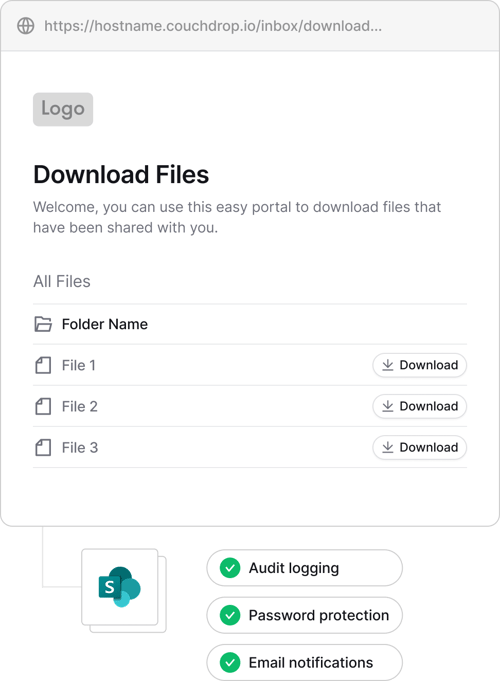
Create secure file sharing portals for external users

Couchdrop Shared Links let you share files and folders containing PHI with patients, providers, and other external users without giving them access to your internal storage or requiring a Couchdrop account.

  • Share files or full directories
  • No Couchdrop account required for recipients
  • Works with your existing cloud and on-premises storage

Add protection to every HIPAA file share

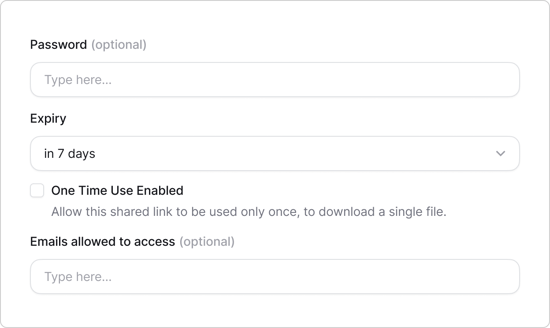
Configure each Shared Link with the controls required for the files and recipients involved.

  • Restrict access to approved email addresses
  • Require passwords, email verification, or 2FA
  • Set expiration dates or single-use access
  • Revoke or update access at any time
Product interface showing HIPAA Shared Link configuration
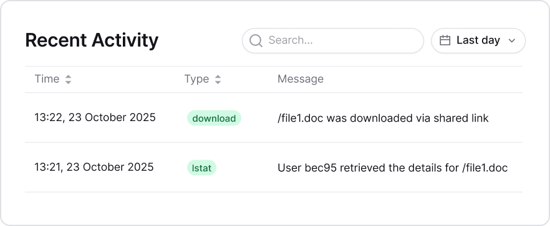
Interface showing recent Shared Link activity and audit logs for HIPAA

Keep a complete record of file sharing activity

Couchdrop records Shared Link activity so your team can see when sensitive files are accessed and downloaded.

Use detailed audit logs, download notifications, and supported SIEM integrations to maintain visibility over external file-sharing activity.

Share files externally while maintaining clear control, visibility, and ownership over where your HIPAA data is stored

SharePoint logo Google Drive logo Dropbox logo OneDrive logo Box logo Egnyte logo Amazon S3 logo Digital Ocean logo Azure Blob logo Wasabi logo Filebase logo Backblaze B2 logo Google Cloud logo iDrive logo Windows Server logo OSX Server logo

How a US-based Healthcare company automated HIPAA-Compliant document collection using Couchdrop

Frequently asked questions

Is Couchdrop HIPAA-compliant?
Couchdrop provides enterprise-grade security controls that support HIPAA compliance requirements when used with a signed Business Associate Agreement (BAA). You must have a BAA in place before processing any HIPAA-regulated Protected Health Information through our service.
Can I share PHI using a Couchdrop Shared Link?
Yes, once your organization has the appropriate Couchdrop HIPAA configuration and a valid BAA in place. Shared Links provide controlled browser-based access to specific files and folders, with options including password protection, email restrictions, two-factor authentication, expiration, and single-use links.
Do recipients need a Couchdrop account?
No. Recipients can access files through the secure Shared Link without having a Couchdrop account or credentials for your underlying storage platform.
Does Couchdrop store another copy of my files?
No. Couchdrop is designed to connect to your existing storage and stream files during transfers rather than acting as another permanent storage repository for your files.

Secure file sharing for HIPAA-regulated workflows

Couchdrop helps you share sensitive files externally with access controls, audit logging, and your existing storage. Before sharing PHI, talk to our team to put a BAA in place.


g2-spring-25-best-support g2-high-performer-latest g2-spring-25-easiest