No-code File Automation
Automate SFTP and file transfers without writing code
From scheduled file transfers to multi-step automations with conditional logic, encryption, and dynamic file routing, Couchdrop helps you build reliable file workflows without maintaining scripts or servers.
Instant access • 14 day free trial • No card required
Trusted by thousands of organizations around the world

Get advanced file automation in a simple, fully managed cloud platform
Schedule transfers automatically
Set workflows to run daily, weekly, or at custom intervals. Automatically retrieve files from an SFTP server, transfer reports to cloud storage, or deliver files to business partners without someone having to initiate each transfer.
Trigger workflows when files arrive
Run automations in response to supported file events, external webhooks, or manual activation. Process incoming files as part of an automated workflow rather than relying on someone to check a folder and perform the next step.
Build multi-step workflows with ease
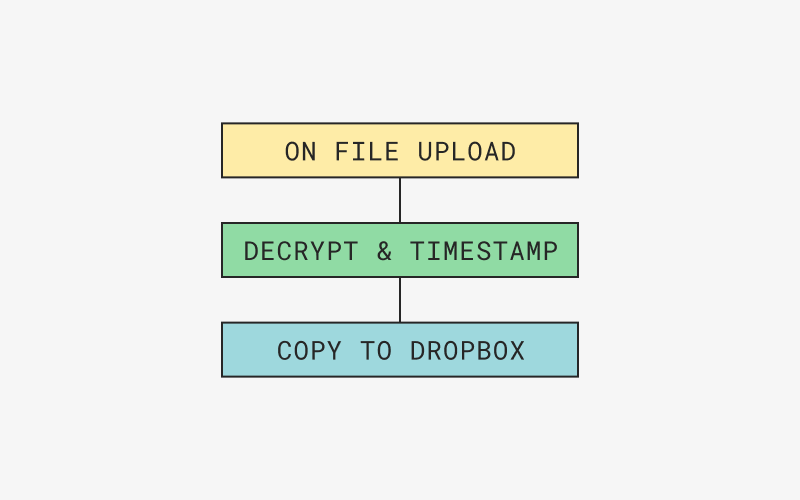
Create workflows by connecting triggers, actions, and conditions in Couchdrop's visual automation builder. Combine file transfers, filtering, transformations, and notifications in one workflow without writing Python scripts or configuring cron jobs.
Process files as they move
Automate more than delivery. Use file-processing actions to rename, extract, transform, encrypt, or decrypt files as part of a larger workflow. Prepare files for downstream systems without having to manage separate processing scripts.
Use variables and conditional logic
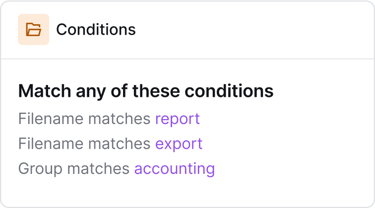
Create workflows that adapt based on file details, user information, events, or timestamps. Extract information from filenames or file contents, apply conditional logic, and use dynamic variables to control how files are processed, named, and delivered.
Keep workflows running smoothly
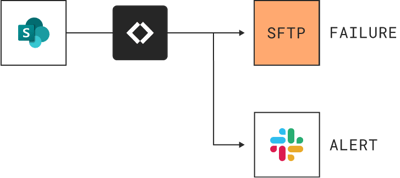
Build resilience into your automations with failover branches and exception handling to manage unexpected errors. Monitor workflow execution, investigate failures, and receive notifications via email, Slack, or Microsoft Teams when something needs attention.
Why choose Couchdrop
Simplify and scale your file-based automations
Build powerful file workflows without managing scripts, servers, or complex integrations. Couchdrop brings file transfers, processing, conditional logic, and monitoring together in one managed platform.
Purpose-built for file processing
Unlike general-purpose integration platforms focused on API calls, Couchdrop is designed for file-based workflows. Move, rename, transform, encrypt, decrypt, and route files between systems using visual automations built around how businesses exchange files.
Flexible triggers and intelligent workflows
Run automations on a schedule, when supported file events occur, through external webhooks, or manually. Combine triggers with conditional filtering and dynamic variables to process files differently based on filenames, file contents, or other workflow information.
Comprehensive reporting and error handling
Track automation execution, investigate failures, and troubleshoot workflows with detailed reporting. Configure error-handling branches and notifications, and restore previous workflow versions when changes need to be reversed.
Secure, managed file automation
Automate sensitive file workflows on Couchdrop's managed cloud platform without deploying or maintaining your own file transfer infrastructure. Use supported encryption and decryption actions alongside Couchdrop's security and access controls.
Connect SFTP, cloud storage, and business systems
Build workflows across supported SFTP/FTP servers, cloud storage services such as Amazon S3, Azure, SharePoint, and Google Drive, and other connected systems. Automate file movement and processing without developing custom integrations for every workflow.
Built for workflows that grow with your business
Replace repetitive manual processes and individual scripts with reusable, multi-step automations. Use conditional routing, dynamic filenames, workflow reporting, and centralized management to handle increasingly complex file operations.
Learn about building Automations with Couchdrop
Frequently asked questions
Can a workflow start when a file arrives?
Can I use a webhook to trigger an automation?
Can I rename and organize files automatically?
Can I route files based on information inside the filename?
Can I automate PGP encryption and decryption?
What happens if an automation encounters an error?
Can I recover an earlier version of an automation?
Do I need to maintain a server to run these workflows?
“Couchdrop is very easy to setup and maintain. The solution just works. Once you hooked up your cloud storage and mounted it to an endpoint, all you need to do is give access to your SFTP users within the interface. That's it. You're done.”
“Couchdrop takes a legacy method of transfering files and puts a modern spin on it. I love how I can literally put an SFTP front end on basically ANY cloud storage platform. ”
“Couchdrop gives us the flexibility to use whatever back-end storage provider that we want. For example, we are using an S3-based service with immutability turned on, so we can support legacy protocols with the latest in data protection.”
“Couchdrop allows our newer tech stack based on real-time events to work with our customer's older tech stacks that are dependent on SFTP. Additionally, it's great that I don't have to manage an SFTP server, SSH keys, and training of our teams to interact with data we receive from our customers.”
Automate your file workflows with Couchdrop
Start your free trial immediately with no downloads or credit card required.
Have questions or prefer a walkthrough? Talk to our team.