
A U.S.-based transportation company specializing in full-truckload, drayage, and warehousing services wanted to bring their Power BI reporting in-house, which would both save money and give them greater flexibility.
The operational data they needed originally came from Aljex, a Transport Management System (TMS), but they needed a way to feed that data into Power BI for reporting and analytics.
What challenges were they facing?
The company has a single use case they wanted to solve, but it involved two separate challenges that needed to be overcome.
The first was how to receive the data from the Aljex system. The system has limited ways to send data, with one of the options being SFTP. If they could receive the files via SFTP and get them into OneDrive, they could then use them for Power BI reporting that they create and manage in-house.
However, the second problem complicated the setup. The Aljex system generated the same file with the same name every day, meaning that when saved to the same directory, it would overwrite the existing file. These historical records were important and an essential part of reporting, so they needed to find a way to retain multiple versions of the file.
This issue was compounded by urgency. With the current solution, someone needed to retrieve the file every single day, or it would be overwritten. At this point, the process was entirely manual, meaning data would be lost if someone forgot to grab the file for the day.
With a single use case for a specific external party, spinning up and managing dedicated infrastructure wasn't a feasible solution. Instead, the goal was to find a simple, all-in-one solution that could handle everything involved with retrieving and managing files from this source.
Why couldn't they use standard file transfer methods?
Standard SFTP servers or basic cloud storage wouldn't solve their problem because they needed:
- SFTP endpoint to receive daily data exports from Aljex
- Simple setup and management without having to maintain machines or manage job settings
- No code automation with dynamic file organization to prevent new files from overwriting historical data
- Integrations with OneDrive to avoid having to manually move files from SFTP to OneDrive.
How did Couchdrop provide the solution?
The company learned about Couchdrop through a word-of-mouth recommendation and discovered it could handle their entire workflow from end to end.
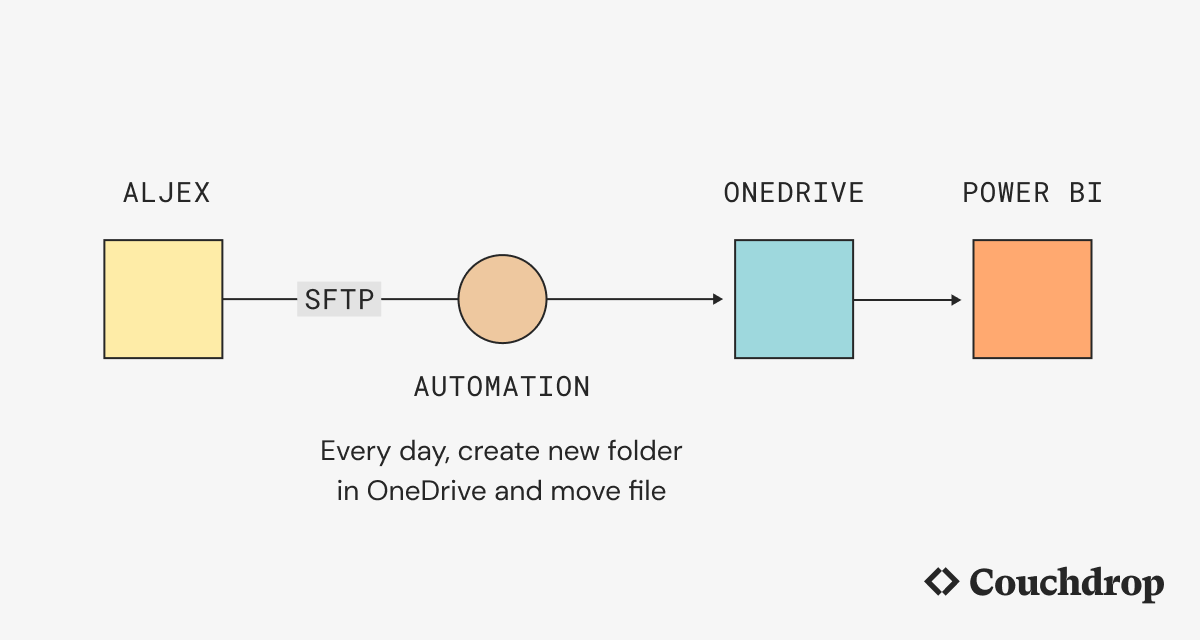
Couchdrop provided an SFTP endpoint where Aljex could deliver daily data exports, which used Couchdrop's native OneDrive integration to send the files directly to OneDrive via SFTP.
What the company wasn't expecting was that Couchdrop's file actions could automate their entire workflow. These files were generated daily, so every day, a new transfer automation would pull the new file and move it into OneDrive.
In this process, file actions would move a copy of the file to a dynamically named folder in OneDrive based on the date the file was generated. This would allow Power BI to easily access complete records, and the process would be fully automated without manual steps.
What results did they achieve?
Couchdrop allowed the company to have a single service that could both accept files from their TMS system into OneDrive and process each file on the way. By having the files in OneDrive, Power BI could work with the complete data set to help the company make data-driven decisions, and they could manually change parameters for their reporting as needed.
Because these issues could both be solved with automated workflows, the solution also eliminated the risk of accidentally overwriting data. This means team members no longer need to remember to obtain the file every day, both lowering risk and allowing them to work on more productive tasks.