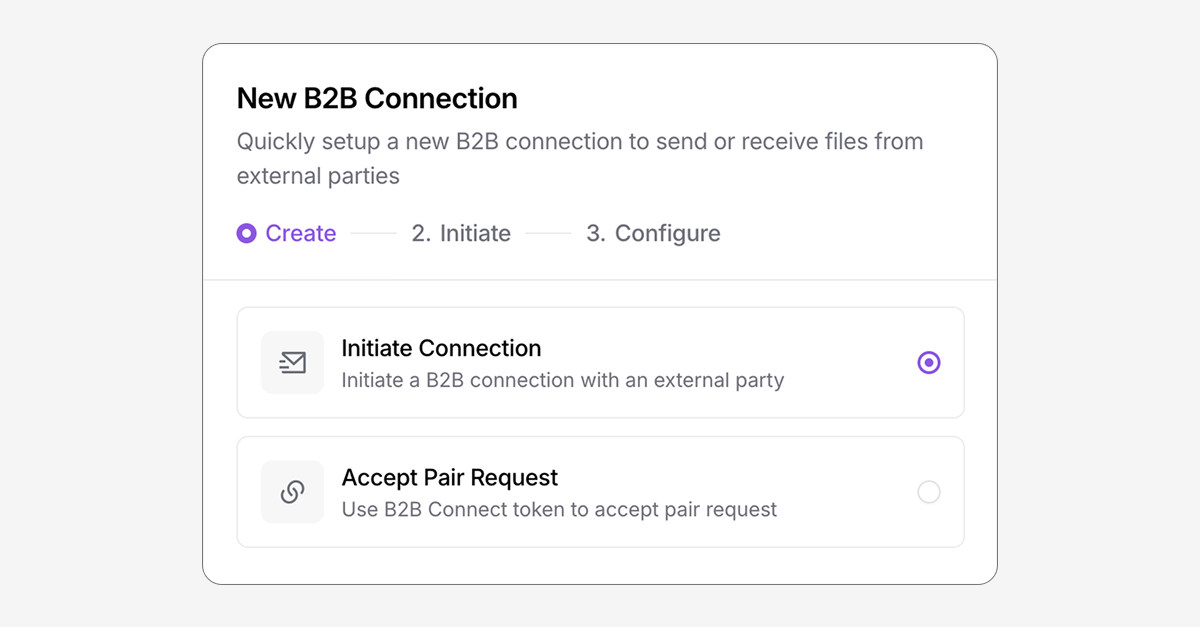
Meet B2B Connect, the easiest way to quickly and securely exchange files with other businesses. Pair with an external business in seconds and transfer files directly between each other's storage accounts securely with no advanced configurations required.
What is B2B Connect?
B2B Connect is a new connection type in Couchdrop that pairs two organizations together so one business can securely send files directly to a folder in the other’s storage account.
What makes it different from other transfer methods is that both parties configure storage integrations in their own accounts, so credentials are never shared, allowing businesses to use an external organization’s storage account as a secure endpoint.
The sender can move files from multiple sources into this folder, allowing them to easily and securely transfer files to their partner no matter where the files originate from.
The receiving party can choose any folder as their destination, including virtual paths pointing to cloud storage directories. The destination information never needs to be given to the sender, either.
This means the sender has full control over how and from where files are sent, while the receiver has full control over where they arrive.
How to invite a business to receive files from you
You can invite an external business to securely receive files in 3 easy steps.
- Add a new B2B Connection in the B2B Connect tab and choose to initiate a connection, then send files and include an email for the other business. A new outbound B2B folder is created for this connection.
- Couchdrop sends an email with an invitation to receive files. This prompts the user to choose a folder where they want to receive the files, which can be any of Couchdrop’s supported storage platforms.
- The businesses are now paired. Any files you add to this B2B Connect folder are immediately sent to the directory the receiving partner configured.
How to invite a business to send you files
Receiving files works similarly, only you configure the storage destination endpoint, and the outbound B2B folder is added to your partner’s account. Any files they add to the folder are immediately transferred into the directory you connected.
A simple way to exchange files with other businesses
B2B Connect is a simple, secure way to directly exchange files with other businesses, and it can be combined with other Couchdrop features as well. For example, you could create a transfer automation to automatically move files from a Google Workspace folder into a B2B Connect folder connected to a partner's SharePoint site daily to automate the process of daily file transfers from Google Workspace to your partner's SharePoint.
B2B Connect is available to all users. Give it a try today.