
man holding keys in front of blue car

Couchdrop for Automotive

SFTP and managed file transfer for auto dealerships

Send, receive, and automate file transfers across dealership locations, software platforms, suppliers, and business partners. Couchdrop combines managed SFTP, file automation, and secure file sharing in one straightforward platform, with direct delivery into your existing storage.

Instant access • 14 day free trial • No card required

Built for organizations exchanging sensitive business data
BrewDog logo Inzata logo Jacuzzi logo Contrast logo Steve Madden logo Fundipedia logo Natural History Museum logo Breville logo Veeva logo Options Technology logo BrewDog logo Inzata logo Jacuzzi logo Contrast logo Steve Madden logo Fundipedia logo Natural History Museum logo Breville logo Veeva logo Options Technology logo BrewDog logo Inzata logo Jacuzzi logo Contrast logo Steve Madden logo Fundipedia logo Natural History Museum logo Breville logo Veeva logo Options Technology logo
SOC 2 Type II Certified
Fully Managed Cloud Service
No-Code File Automation

Make file exchange straightforward across your business
cloud-sftp-hero2-animated

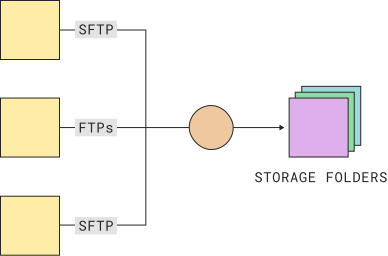
Exchange files through managed SFTP

Connect with suppliers, manufacturers, finance providers, marketing platforms, and other third parties over SFTP or FTP without deploying or maintaining a file server.

Connect dealership software, suppliers, and partners

Exchange files with DMS, CRM, inventory, and reporting platforms, including supported file-based workflows involving DealerSocket, vAuto, Dealertrack, DriveCentric, VinSolutions, and other automotive systems.
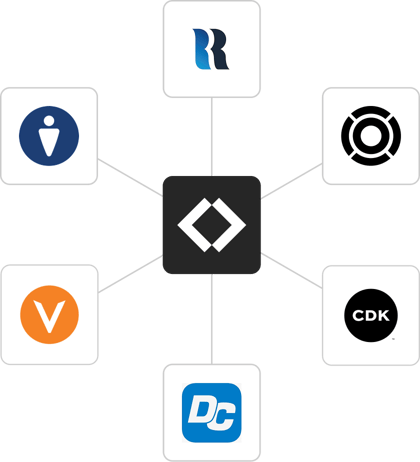
Automotive software integrations with Couchdrop
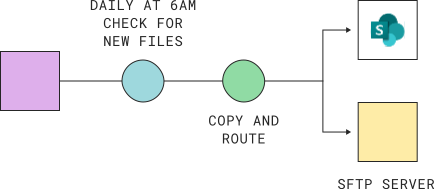
daily-transfer-files-to-sftp-server-and-sharepoint-animated

Automate inventory and reporting workflows

Move inventory feeds, sales reports, financial exports, and other operational files between systems and dealership locations without maintaining custom transfer scripts or manually handling each file.

Get visibility into file transfers and workflows

Monitor incoming and outgoing files, review transfer activity, and configure notifications when files are uploaded, downloaded, or transfers fail.
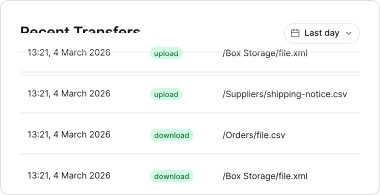
logistics-recent-activity-animated

Make files available where your teams already work, without introducing another system for storing and managing data

SharePoint logo Google Drive logo Dropbox logo OneDrive logo Box logo Egnyte logo Amazon S3 logo Digital Ocean logo Azure Blob logo Wasabi logo Filebase logo Backblaze B2 logo Google Cloud logo iDrive logo Windows Server logo OSX Server logo

How a dealership simplified daily vendor file transfers with Couchdrop

G2 easiest to do business with award - spring 2025 G2 best support award - spring 2025

“Couchdrop integrates seamlessly with our own cloud storage provider, creating instant efficiency gains for our internal employees while simultaneously making uploads simple & easy, with full security for our clients.”

4.9 on G2

Marcus – G2 Review

Frequently asked questions

Do we need to set up or maintain an FTP or SFTP server?
No. Couchdrop provides fully managed cloud FTP and SFTP services, so there's no server infrastructure to deploy, patch, or maintain.

You can configure your file-transfer accounts, connect existing storage, and provide vendors with the connection details they need to start sending files.
Can Couchdrop receive files from our DMS and other dealership software?
Yes. Couchdrop provides managed FTP and SFTP destinations for receiving files from dealership software that supports these transfer methods. This includes supported file-based workflows involving platforms such as CDK Global, DealerSocket, Dealertrack, vAuto, DriveCentric, VinSolutions, and DealerCenter.

Available export and transfer options vary by provider, so check with your software vendor to confirm its supported connection methods.
Can we exchange files with suppliers, manufacturers, and other partners?
Yes. Couchdrop lets you securely send and receive files with suppliers, OEMs, finance providers, marketing agencies, and other third parties.

You can create separate accounts and folders for different partners, control what they can access, and automate file delivery to your existing storage.
Can we manage file transfers across multiple dealership locations?
Yes. Couchdrop gives dealership groups a centralized platform for managing file transfers across multiple locations, departments, and external partners.

You can organize transfers by dealership or business function, configure individual access permissions, and automatically route files to the appropriate storage locations.
Can we automate inventory feeds, reporting, and other recurring transfers?
Yes. Couchdrop supports scheduled and event-driven file automation. You can automatically receive, rename, organize, copy, and distribute files between supported systems and storage locations.

This is useful for recurring inventory feeds, dealership reporting, vendor exports, and file distribution across multiple locations.
How does Couchdrop help protect sensitive dealership data?
Couchdrop supports encrypted file transfers, access controls, activity logs, and other security features to help dealerships manage how sensitive information is exchanged with external parties.

These capabilities can support your dealership's security and compliance requirements, including obligations under the Gramm-Leach-Bliley Act (GLBA) and FTC Safeguards Rule, as part of a broader compliance program.

Get instant access to Couchdrop with a free 14-day trial

Set up secure SFTP for your dealership, automate file transfers, and connect your existing storage. Free for 14 days, no credit card required.


g2-spring-25-easiest g2-high-performer-latest g2-spring-25-best-support