








Couchdrop vs. HIPAA Vault for HIPAA transfers
Organizations handling sensitive information need secure ways to exchange files with customers, partners, and external systems. For businesses subject to HIPAA requirements, this also means protecting electronic protected health information (ePHI) throughout the file transfer process.
Couchdrop and HIPAA Vault both support secure file exchange, but they take fundamentally different approaches.
Couchdrop extends the cloud storage platforms your business already uses, including Microsoft SharePoint, Google Drive, Box, and OneDrive. It adds managed SFTP, secure file sharing, and automated file transfers without requiring you to replace your existing storage infrastructure.
HIPAA Vault provides managed hosting and secure file transfer infrastructure, offering organizations a dedicated environment for storing and exchanging sensitive information.
This distinction matters for healthcare providers, insurance organizations, third-party administrators, and other businesses that need to exchange sensitive files while maintaining their existing systems and compliance requirements.
In this comparison, we'll examine how Couchdrop and HIPAA Vault differ in their approach to storage, file transfer, automation, security, and pricing.
Feature Comparison
| Feature | Couchdrop | HIPAA Vault |
|---|---|---|
| Primary focus | Secure file exchange and automation across existing systems | Managed hosting and secure file storage |
| Cloud storage | Connects directly to SharePoint, Google Drive, Box, OneDrive, and other platforms | Provides managed storage and hosting infrastructure |
| Managed SFTP | Cloud-native SFTP without server management | Dedicated managed SFTP environments |
| HIPAA support | HIPAA-ready configurations with BAA availability | HIPAA-focused infrastructure with BAA |
| File transfer automation | Scheduled and event-driven workflows across connected systems | Scripted transfers and API automation on eligible plans |
| External file sharing | Shared Links, Upload Portals, and controlled SFTP access | Browser-based file management and protected sharing on eligible plans |
| Access controls | Folder permissions, SSH keys, IP restrictions, MFA, and SSO/SAML | Role-based permissions, IP restrictions, and two-factor authentication |
| Audit logging | File transfer activity and audit logs | File access and transfer audit logs |
| Infrastructure management | Fully hosted SaaS | Managed infrastructure |
| Application hosting | Not available | Managed Linux, Windows, WordPress, and healthcare application hosting |
| Pricing approach | Based on transfer usage, endpoints, and requirements | Based on allocated infrastructure and service plans |
Based on published vendor information reviewed in November 2026. Features and plan eligibility may vary.
Cloud Storage
The most important difference between Couchdrop and HIPAA Vault is how each platform fits into your existing IT environment.
Many businesses already rely on cloud platforms such as SharePoint, Google Drive, or Box to store and manage documents. These systems support established permissions, retention policies, and internal collaboration.
However, they do not always provide the external file transfer capabilities required to exchange information with partners using SFTP or automated workflows.
Organizations typically have two approaches to solving this problem: extend their existing cloud storage with secure file transfer capabilities or introduce a separate managed environment for exchanging files.
Couchdrop integrates with your existing cloud storage
Couchdrop is designed to work alongside the storage platforms your business already uses.
Rather than moving files into a separate permanent repository, Couchdrop connects to your existing cloud storage and provides additional ways to receive, send, and automate file transfers.
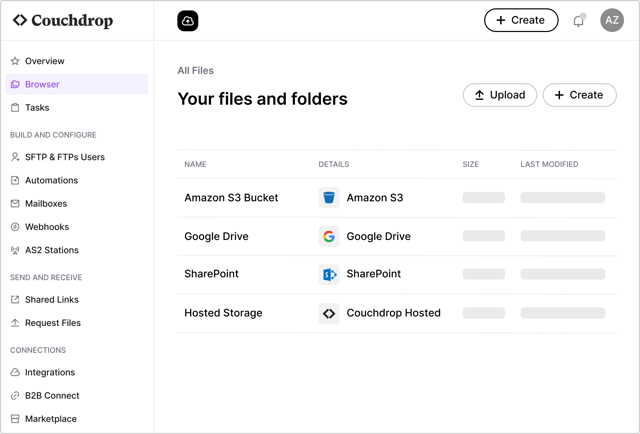
For example, an insurance company using SharePoint to manage claims documents may need to receive files from brokers, third-party administrators, or external processing partners over SFTP.
With Couchdrop, the company can provide those partners with SFTP access to designated SharePoint folders.
Files can be delivered directly into the existing SharePoint environment, where the organization can continue using its established storage permissions, retention policies, and internal workflows.
Couchdrop also supports scheduled transfers between external SFTP servers and cloud storage platforms, removing the need to manually download and upload files.
This approach is particularly useful for organizations that have already invested in cloud storage and want to add secure file exchange capabilities without introducing another storage system.
HIPAA Vault provides managed infrastructure for file storage
HIPAA Vault approaches secure file exchange through managed hosting infrastructure.
Its services include managed SFTP environments, Linux and Windows hosting, and healthcare-oriented application hosting.
For managed SFTP, HIPAA Vault provides dedicated infrastructure hosted on Google Cloud Platform, with server management and security monitoring handled by the provider.
This gives organizations a managed location for receiving, storing, and distributing sensitive files.
HIPAA Vault can be appropriate for businesses looking to establish a dedicated secure hosting environment rather than build on their existing cloud storage platforms.
However, organizations already using SharePoint, Google Drive, or Box should consider how introducing a separate file storage environment will affect their existing workflows, access management, and data governance.
HIPAA Compliance and Security
HIPAA compliance is not established simply by using a product described as secure or HIPAA compliant.
Organizations handling electronic protected health information (ePHI) must evaluate the security of their complete workflow, including access controls, audit logging, encryption, risk management, and contractual responsibilities.
The HIPAA Security Rule establishes administrative, physical, and technical safeguard requirements for protecting ePHI.
The U.S. Department of Health and Human Services (HHS) also explains that cloud service providers handling ePHI on behalf of regulated organizations generally act as business associates and must have appropriate contractual arrangements in place.
This means the security capabilities of a file transfer platform are only one part of an organization's broader compliance responsibilities.
Couchdrop's approach to HIPAA
Couchdrop provides a Business Associate Agreement (BAA) for HIPAA customers. It also offers encrypted file transfers, access permissions, audit logging, and security controls designed to support regulated file exchange.
Couchdrop's bring-your-own storage approach provides SFTP access and automated file transfers without requiring a separate permanent storage repository. This allows businesses to retain their established storage governance practices while adding new file exchange capabilities.
File processing and temporary copies
When transferring files between connected storage systems, Couchdrop processes file contents in memory rather than permanently storing another copy on its platform. Temporary processing data is deleted after the transfer.
This differs from using Couchdrop-hosted storage, where files are intentionally stored in the configured storage environment.
Data retention
When organizations use Couchdrop with their existing cloud storage, files remain subject to the retention policies configured in those systems.
Couchdrop separately maintains account information and audit records required to operate and monitor the service. Account data is purged 90 days after cancellation, while audit log retention depends on configuration and service arrangements.
Organizations should confirm the retention periods applicable to their account and HIPAA requirements.
Audit logging and monitoring
Couchdrop records file transfer activity, authentication events, administrative changes, and file operations.
Audit records can include timestamps, event types, users, and associated systems. Logs can be searched, exported, accessed through an API, or streamed to supported security monitoring platforms.
This enables organizations to monitor external file exchange activity alongside their existing security operations.
Subprocessors and connected services
Couchdrop uses third-party service providers for aspects of its infrastructure and business operations. Information about these providers is available through the Couchdrop Trust Center.
Business Associate Agreements
Couchdrop offers a BAA for HIPAA customers and this must be completed before transferring ePHI. For additional information, see Couchdrop's Security and Privacy documentation and Audit Logging and Reporting.
HIPAA Vault's approach to HIPAA
HIPAA Vault provides managed infrastructure with security capabilities intended for HIPAA-regulated workloads.
Its managed SFTP offering includes a BAA, audit logging, two-factor authentication, intrusion detection, and managed infrastructure security.
This model may appeal to organizations that want a provider to manage the underlying hosting environment, including server maintenance, security monitoring, and infrastructure administration.
The main difference is not whether either platform supports secure file transfers. It is where the files are hosted and how the transfer service fits into an organization's existing infrastructure.
What healthcare organizations should verify
When evaluating either platform, healthcare organizations should confirm that the service's security capabilities and contractual arrangements meet their requirements.
Key considerations include:
- BAA coverage: Confirm that a signed BAA covers the intended workflow before transferring ePHI.
- Data handling: Understand where files are stored, how temporary processing data is handled, and which retention policies apply.
- Auditability: Verify that audit logs capture the required activity and remain accessible for the organization's required retention period.
- Connected services: Review cloud storage providers, infrastructure subprocessors, and other services involved in handling ePHI.
- Incident response: Confirm the provider's notification procedures, contractual commitments, and responsibilities in the event of a security incident.
File Automation and Integrations
Secure file transfer is rarely limited to uploading and downloading individual files. Many organizations need to exchange information repeatedly between partners, cloud storage platforms, and business systems.
This is particularly relevant in healthcare and insurance, where files often move between organizations that use different technologies.
Automating file workflows with Couchdrop
Couchdrop is built to connect systems and automate file movement between them. Organizations can configure scheduled and event-driven workflows to transfer files between supported cloud storage platforms and external SFTP servers.
Consider an insurance organization that receives claims documents from an external administrator. The administrator makes files available on an SFTP server, while the insurance company manages its documents in SharePoint.
Using Couchdrop, the organization can configure a workflow that:
- Connects to the external administrator's SFTP server.
- Checks the designated folder for new files on a schedule.
- Transfers those files to the appropriate SharePoint document library.
- Records transfer activity for monitoring and auditing.
Additional supported actions, such as renaming files or decrypting PGP-encrypted documents, can be included where required.
This removes repetitive manual file handling and allows the organization to keep using SharePoint as its primary document repository.
Automating file transfers with HIPAA Vault
HIPAA Vault offers automation capabilities primarily through secure file transfers and managed cloud infrastructure.
Its SFTP service supports automated file transfers using scripts across all plans. The Plus and Max plans also provide API access, allowing organisations to integrate secure file transfers into more complex workflows.
For enterprise customers, HIPAA Vault offers Google Cloud services, including Cloud Composer for scheduling and coordinating workflows and Cloud Functions for running custom code. Its managed Cloud SQL services also support automated database backups and replication.
These capabilities are primarily designed for infrastructure management and data exchange. While HIPAA Vault supports custom integrations, its published documentation does not identify any ready-made integrations with specific electronic health record (EHR) or practice management systems.
Deployment and Infrastructure Management
Couchdrop and HIPAA Vault both provide managed SFTP services, but they differ significantly in how quickly organizations can get started and how their infrastructure is deployed.
Couchdrop is a cloud-native SaaS platform
Couchdrop is a fully hosted, cloud-native SaaS platform designed for rapid deployment without the need to provision or manage dedicated infrastructure.
Organizations can connect existing cloud storage, create SFTP users, configure access permissions, and establish automated file transfer workflows in minutes.
There is no requirement to deploy virtual machines, configure operating systems, provision dedicated servers, or maintain SFTP infrastructure.
For organizations already using SharePoint, Google Drive, Box, or OneDrive, Couchdrop can provide secure file transfer capabilities almost immediately, without changing their underlying storage architecture.
For HIPAA-regulated workflows, the technical setup takes minutes. The main additional step is completing the BAA before transferring protected health information.
Depending on business hours, this may extend the overall time to production to several hours. The delay is administrative rather than a technical deployment requirement.
HIPAA Vault provides managed cloud infrastructure
HIPAA Vault's managed SFTP offering uses dedicated infrastructure hosted on Google Cloud Platform. Its plans specify allocated resources, including virtual CPUs, RAM, SSD storage, and concurrent transfer limits.
HIPAA Vault manages the underlying server infrastructure, including maintenance, security monitoring, and operational administration.
However, this approach introduces a different onboarding timeline. On its website, HIPAA Vault claims a fastest time to live of 48 hours, compared with the minutes typically needed to configure Couchdrop's cloud-native SFTP service.
Deployment and Operational Requirements
| Couchdrop | HIPAA Vault | |
|---|---|---|
| Deployment model | Cloud-native SaaS | Dedicated managed infrastructure |
| Initial technical setup | Minutes | Provider-managed provisioning |
| Advertised time to live | Minutes for standard SFTP setup | 48 hours at fastest |
| HIPAA onboarding | BAA completion required before ePHI transfers | BAA included with managed SFTP plans |
| Existing cloud storage | Direct integration with SharePoint, Google Drive, Box, OneDrive, and others | Separate managed hosting environment |
| Server provisioning | Not required | Managed by HIPAA Vault |
| Infrastructure maintenance | Fully managed by Couchdrop | Fully managed by HIPAA Vault |
Deployment timelines distinguish initial technical configuration from full HIPAA production readiness. Actual onboarding time may vary with organizational approvals, BAA completion, and integration requirements.
What this means for you
Both platforms eliminate the need to operate and maintain your own SFTP servers. The key difference is how quickly they can be deployed and how they fit into your existing environment.
Pricing and Other Costs
The platforms use different pricing models, reflecting their respective approaches.
HIPAA Vault pricing
HIPAA Vault prices its managed SFTP offering around allocated infrastructure and service capabilities.
| Plan | Monthly price | SSD storage | Maximum concurrent transfers |
|---|---|---|---|
| Light | $439 | 20GB | 60 |
| Plus | $539 | 40GB | 60 |
| Max | $639 | 60GB | 120 |
USD, based on published month-to-month pricing reviewed November 2026.
All three plans include managed SFTP infrastructure and a BAA. Higher-tier plans provide additional functionality and infrastructure capacity.
Couchdrop pricing
Couchdrop's pricing is based on usage, including inbound connections, transfer volumes, and automation requirements.
| Plan | Monthly price | Hosted storage | Transit data | Maximum concurrent transfers |
|---|---|---|---|---|
| Link | $50 | 100GB | 10GB | Unlimited |
| Essentials | Contact sales | 1TB | 1TB | Unlimited |
| Business | Contact sales | 5TB | 5TB | Unlimited |
USD, based on published month-to-month pricing reviewed November 2026.
For organizations handling electronic protected health information (ePHI), Couchdrop's HIPAA add-on is available only on Essentials plans and above. The $50/month Link plan is not eligible for the HIPAA add-on.
Couchdrop's HIPAA-enabled plans are competitively priced alongside HIPAA Vault's SFTP offerings, with pricing tailored to the organization's storage, file transfer, automation, and compliance requirements.
Contact Couchdrop sales for a tailored HIPAA quote.
Comparing total costs
The monthly subscription price is only one part of the cost of implementing secure file transfers. Organizations should also consider how each platform fits into their existing infrastructure.
When comparing costs, consider:
- Existing storage: Whether your organization can continue using its current cloud storage or needs additional hosted storage.
- Infrastructure management: Whether dedicated server resources are necessary or a fully managed SaaS service is sufficient.
- Automation: The cost and effort of transferring files between external partners and internal systems.
- Compliance requirements: BAA availability, eligible plans, security controls, and any additional compliance-related costs.
- Operational overhead: The time required to administer users, permissions, workflows, and data retention across multiple systems.
Which Should You Choose?
The right choice between Couchdrop and HIPAA Vault depends on your existing infrastructure and how your organization needs to exchange sensitive files.
Choose HIPAA Vault if you need dedicated managed hosting infrastructure for storing and exchanging sensitive information, alongside provider-managed server administration and security monitoring.
Choose Couchdrop if you already use SharePoint, Google Drive, Box, or other cloud storage platforms and need to add secure SFTP access, external file sharing, and automated file transfers without introducing a separate storage environment.
For healthcare providers, insurers, and third-party administrators, Couchdrop offers a way to connect existing systems with external partners while supporting HIPAA-regulated workflows through appropriate security controls and a Business Associate Agreement.
To learn more about using Couchdrop for healthcare file exchange, explore Secure File Transfers for Healthcare or Managed File Transfer.